A speaker can be brilliant—and still come across awkward on stage. Not because of their words. Because of the stage podium placement. Put it in the wrong spot and you get:
- harsh shadows on the face
- glare on acrylic
- blocked sightlines for the audience
- camera shots full of heads and clutter
- the school crest or brand hidden behind the speaker
Put it in the right spot and everything feels effortless: confident speaker, clean photos, clear audio, and an audience that stays engaged. This UK-focused guide shows exactly how to position a stage podium (lectern) for the best lighting, camera angles, and audience view—in school halls, churches, community venues, and corporate spaces.
Table of Contents
What “Good Stage Podium Placement” Actually Achieves
A well-placed stage podium does three jobs at once:
- Supports the speaker (comfort, posture, confidence)
- Serves the audience (visibility and clarity from every row)
- Serves the camera (clean frame, readable branding, flattering light)
Most event problems happen when you optimise for only one.
Start With the Room (Because Every Venue Lies)
Before you place anything, answer these three questions:
1) Where is the audience sitting?
- Flat seating in rows (most UK school halls)
- Fixed seating (churches, theatres)
- Mixed standing + seated (assemblies, awards)
2) Where is the main light coming from?
- Ceiling downlights (common and often harsh)
- Side windows (great… unless it backlights the speaker)
- Stage lighting (best if controlled)
3) Where will cameras be positioned?
- One phone at the back
- A photographer moving around front
- A fixed tripod for livestream/recording
If you don’t decide this early, the podium ends up wherever someone drops it—and that’s when the problems start.
The Best Default Stage Podium Position (Works in Most UK Venues)
If you want a safe starting point:
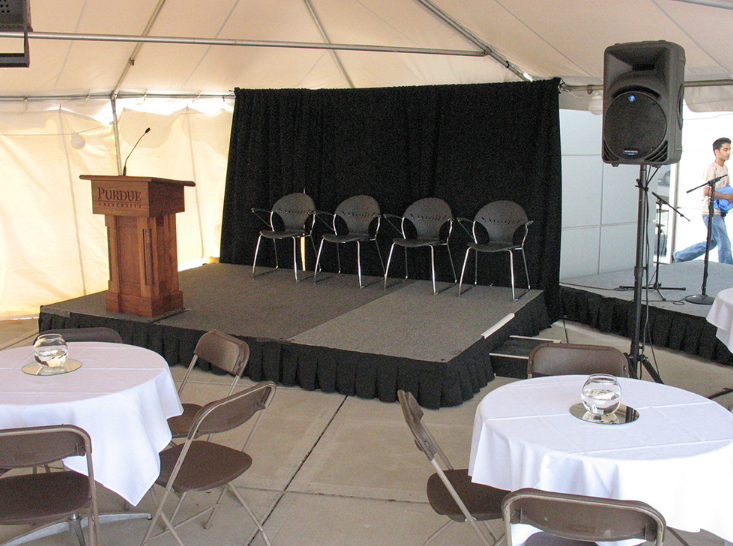
✅ Place the podium slightly off-centre, about 1–1.5m back from the front edge of the stage (adjust to stage size).
Why off-centre beats centre
- The speaker doesn’t block the backdrop/branding
- Photos look more dynamic
- It leaves space for awards, performers, or screen content
- It reduces the “lectern stuck in the middle” look
Exception: If the event is a single keynote and you want maximum formality, centre can work—if lighting and camera are planned.
Podium Placement for Audience View (Sightlines That Actually Work)
The UK school hall problem: flat floors
In flat seating, rows of heads block the view fast. Your podium placement should help the speaker stay visible.
Do this:
- Keep the podium far enough forward so the speaker’s face is visible
- Avoid placing it too deep under a proscenium or low ceiling lights
- Angle it so the speaker can address the whole room, not one side
Don’t do this:
- Don’t tuck the podium into a corner “to save space”
- Don’t place it behind tall floral displays or banners
- Don’t put it directly in front of a projector beam (distracting and messy)
Quick test: Sit in the back row. If you can’t see the speaker’s face, move the podium forward or raise the stage height.
Stage Podium Placement for Lighting (No More “Panda Eyes” or Silhouettes)
Lighting is the difference between “professional” and “we tried”.
1) Avoid harsh downlights directly above the podium
Ceiling lights often create shadows under eyes and nose.
Fix:
- Move the podium slightly forward or back to find a softer zone
- If you have stage lights, add gentle front fill
2) Avoid backlighting from windows
If the speaker stands with bright windows behind them, they become a silhouette.
Fix:
- Rotate the stage setup so windows are to the side, not behind
- Use curtains/blinds if available
- Place the podium so the speaker faces the brighter side (light on face)
3) Watch out for reflective podium surfaces
Acrylic and glossy finishes can catch glare.
Fix:
- Tilt the podium slightly
- Move it out of direct light beams
- Use matte branding panels where possible
Phone test: Open your camera and zoom slightly from the back row. If the speaker’s face looks dark or shiny, adjust placement before the event starts.
Podium Placement for Camera Angles (Clean Shots, Better Photos)
Most UK events are filmed on phones. That means camera placement is predictable:
- centre-back aisle
- side aisle near the front
- photographer moving across the front row
Your job is to make those shots easy.
1) Leave a clear camera lane
Don’t block the central aisle with podium cables or random stands.
2) Keep the podium out of “head clutter”
If the podium is too low and too far back, cameras capture a sea of heads.
Fix:
- move it forward
- raise stage height (when appropriate)
- elevate the main camera on a tripod
3) Make branding visible in frame
If you have a school crest, banner, or sponsor wall:
- place podium so branding is behind the speaker, not hidden by them
- avoid placing it too close to the backdrop (creates shadow and looks cramped)
4) Account for the microphone stand
A separate mic stand can ruin photos if it’s placed awkwardly.
Best approach:
- podium-mounted mic where possible
- if using a stand, align it cleanly and keep it symmetrical in shot
Podium Placement by Event Type (Quick UK Scenarios)
School assembly
- Off-centre podium
- Speaker must be visible from back row
- Keep clear flow for pupils on/off stage
Awards day / medal ceremony
- Podium off-centre
- Leave centre space for winners and photos
- Ensure photographer has room to move
Church talk / sermon
- Podium where speaker can address both sides
- Avoid backlit windows
- Keep cables tidy (trip risks in low lighting)
Corporate presentation
- Podium aligned with screen content
- Keep speaker lit from the front
- Prioritise clean camera frames for recording
Common Podium Placement Mistakes (and the Fix)
Mistake 1: Podium too far back
Symptoms: audience can’t see faces; cameras capture heads
Fix: move forward; raise platform if needed
Mistake 2: Podium too close to the edge
Symptoms: speaker feels unsafe; higher fall risk
Fix: pull back 1–1.5m; mark the edge clearly
Mistake 3: Podium in the projector beam
Symptoms: distraction, washed-out visuals
Fix: shift to side; change projector angle
Mistake 4: Podium directly under harsh light
Symptoms: unflattering shadows
Fix: move to a softer lighting zone; add front fill
Mistake 5: Cables everywhere
Symptoms: trip risk, messy photos
Fix: route cables behind and tape down properly
The 5-Minute “Perfect Stage Podium” Setup Routine (Use Every Time)
- Place podium slightly off-centre, 1–1.5m from stage edge
- Sit in back row: confirm face visibility
- Check lighting on phone camera (no silhouette, no glare)
- Check camera framing: branding visible, minimal clutter
- Tape and tidy cables + confirm safe access routes
This is the difference between “it’ll do” and “it looks pro”.
Make Podium Setup Faster, Cleaner, and More Confident
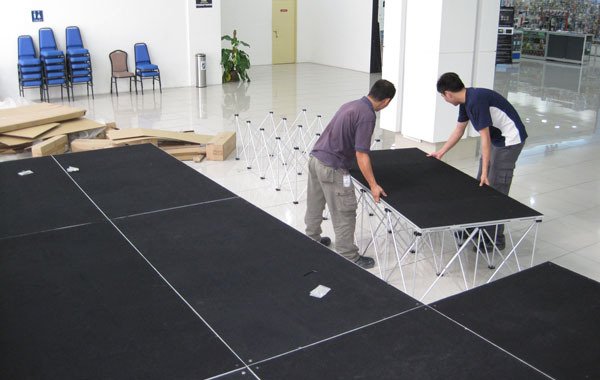
Podium placement is easier when the stage system is stable, modular, and quick to adjust—especially when you need to shift position to fix lighting or camera issues. If you want an event setup that’s easier for staff teams to manage, explore NexGen stage podium solutions built around magnetic lock free portable stage systems—designed for quick setup, confident staging, and cleaner event presentation.
Get a free quote today or contact us to speak with a staging expert — let’s build your next event the smart way.